Backend Guide
Agda Backend
The Agda Backend (option --agda, since 2.8.3) invokes the Haskell backend
and adds Agda-bindings for the generated parser, printer, and abstract syntax.
The bindings target the GHC backend of Agda, in version 2.6.0 or higher.
Example run:
bnfc --agda -m -d Calc.cf
make
The following files are created by the Agda backend, in addition to the files created by the Haskell backend:
AST.agda:
Agda data types bound to the corresponding types for abstract syntax trees in
Abs.hs.Agda bindings for the pretty-printing functions in
Print.hs.Uses pragmas in mutual blocks, which is supported by Agda ≥ 2.6.0.
Parser.agda: Agda bindings for the parser functions generated byPar.y.
IOLib.agda: Agda bindings for the Haskell IO monad and basic input/output functions.
Main.agda: A test program invoking the parser, akin toTest.hs. Usesdonotation, which is supported by Agda ≥ 2.5.4.
The Agda backend targets plain Agda with just the built-in types and functions; no extra libraries required (also not the standard library).
Since 2.9.4: Option --functor puts position information into the
Agda syntax trees (affects generated AST.agda). Relies on the
primitive module Agda.Builtin.Maybe which is available from
Agda 2.6.2.
Java Backend
Generates abstract syntax, parser and printer as Java code.
Main option: --java.
CUP
By default --java generates input for the CUP parser generator,
since 2.8.2 CUP version v11b.
Note
CUP can only generate parsers with a single entry point. If multiple entry points
are given using the entrypoint directive, only the first one will be used.
Otherwise, the first category defined in the grammar file will be used as the
entry point for the grammar.
If you need multiple entrypoints, use ANTLRv4.
Prerequisites
For the Java/CUP backend you need:
To set up CUP and JLex, follow these instructions:
Download the JAVA archives for CUP v11b, CUP v11b runtime, and JLex.
Make sure they are placed in your
CLASSPATH.For example, in Linux or macOS, store these jars in
${HOME}/java-lib/and add the following line to your shell initialization file:export CLASSPATH=${CLASSPATH}\ :${HOME}/java-lib/java-cup-11b.jar\ :${HOME}/java-lib/java-cup-11b-runtime.jar\ :${HOME}/java-lib/JLex-1.2.6.jar
ANTLRv4
ANTLRv4 is a parser generator for Java.
With the --antlr option (since 2.8.2) BNFC generates an ANTLRv4 parser and lexer.
All categories can be entrypoints with ANTLR: the entrypoints directive is
thus ignored.
Make sure that your system’s Java classpath variable points to an ANTLRv4 jar
(download here).
Since 2.9.5 BNFC generates code for String parsing that needs Java 15 or higher.
You can use the ANTLR parser generator as follows:
bnfc --java --antlr -m Calc.cf
make
ANTLRv4 returns by default a parse tree, which enables you to make use of the analysis facilities that ANTLR offers. You can of course still get the usual AST built with the abstract syntax classes generated by BNFC.
From the Calc/Test.java, generated as a result of the previous
commands:
public Calc.Absyn.Exp parse() throws Exception
{
    /* The default parser is the first-defined entry point. */
    CalcParser.ExpContext pc = p.exp();
    Calc.Absyn.Exp ast = pc.result;
    /* ... */
    return ast;
}
The pc object is a ParserRuleContext object returned by ANTLR.
It can be used for further analysis through the ANTLR API.
The usual abstract syntax tree returned by BNFC is in the result field of
any ParserRuleContext returned by the available parse functions
(here exp()).
Haskell Backend
The Haskell backend is the default backend. It targets the Alex lexer generator and the Happy parser generator.
Option -d is strongly recommended. It places the generated files, except for the Makefile into a subdirectory whose name is derived from the grammar file. Example:
bnfc -d -m Calc.cf
make
This will leave the following files (and some more) in directory Calc:
Abs.hsThe generated data types that describe the abstract syntax of the
Calclanguage. Import e.g. via:import Calc.Abs
Since 2.9.1: If some types of generated abstract syntax contain position information, which is the case with option
--functoror in the presence ofposition tokens, then an overloaded method is provided for these types that returns the start position (line, column) of its argument:class HasPosition a where hasPosition :: a -> Maybe (Int, Int)
Print.hsThe generated pretty printer in form of an overloaded function
printTree. Import e.g. as:import Calc.Print ( printTree )
Lex.xThe input file for the Alex lexer generator. The generated lexer
Lex.hsalso contains theTokendefinition. Usually the lexer is just imported by the parser, but if you want to handle tokens for some purpose you can for instance state:import Calc.Lex ( Token(..) )
Par.yThe input file for the Happy parser generator. The generated parser
Par.hsalso contains the lexing function by the namemyLexer. Import lexer and parser (for theExpcategory) via:import Calc.Par ( myLexer, pExp )
Test.hsThis is a sample command line program that just runs the parser on the given input file. You can invoke its compiled form e.g. via
Calc/Test sample.txt. You can use it as model how to piece lexer, parser, and printer together.ErrM.hsThis module is for backwards compatibility only. From BNFC 2.8.4, the generated parser returns
Either String Expwhere theLeftalternative is an error message of typeStringin case the parsing failed and theRightalternative is a regular result (Expin case ofCalc) when parsing succeeded.Until BNFC 2.8.3, the parser returned
Err Expwhich was essentiallyEither String Expunder a new name, with constructorsBadinstead ofLeftandOkinstead ofRight. InErrM.hs, type constructorErris defined as a type synoym forEither StringandBadandOkas pattern synonyms forLeftandRight.Old code developed with the Haskell backend of BNFC 2.8.3 should still continue to work, thanks to the
ErrM.hscompatibility module. There is one exception: An import statement likeimport Calc.ErrM ( Err (Ok, Bad) )
or
import Calc.ErrM ( Err (..) )
does not work anymore, since
OkandBadare not constructors anymore. A robust statement that works both for constructors and pattern synonyms is:{-# LANGUAGE PatternSynonyms #-} import Calc.ErrM ( Err, pattern Ok, pattern Bad )and this is the recommended minimal migration of Haskell code written with BNFC 2.8.3.
Position Information
Since 2.8:
With the --functor option, the generated abstract syntax will
consist of data types with one parameter. The first field of each
constructor holds a value typed by this parameter.
Since 2.9.1:
E.g. for Calc the generated type is Exp' a with e.g. constructor
ETimes a (Exp' a) (Exp' a).
Each parameterized type is a Foldable Traversable Functor.
Further, non-parameterized types, e.g.:
type Exp = Exp' (Maybe (Int, Int))
are generated to characterize the syntax trees returned by the
generated parser. The extra values then hold line and column number
of the starting position of the syntax tree node in the parsed file.
If no position is available, e.g., for an empty list, the value is
Nothing.
In general, however, the extra values can be made to hold any kind of extra information attached to the abstract syntax. E.g. one could store type information reconstructed during a type-checking phase there.
Pygments Backend
Pygments is not really a compiler front-end tool, like lex and yacc, but a widely used syntax highlighter (used for syntax highlighting on github among others).
With the --pygments option, BNFC generates a new python lexer to be used
with pygments.
Usage
There is two ways to add a lexer to pygments:
Fork the pygments codebase and add your lexer in
pygments/lexers/Install your lexer as a pygments plugin using setuptools
In addition to the lexer itself, BNFC will generate an minimal installation
script setup.py for the second option so you can start using the
highlighter right away without fiddling with pygments code.
Here is an example (assuming you’ve put the Calc grammar in the current directory):
bnfc --pygments Calc.cf
python3 -m venv myenv                 # If you don't use virtualenv, skip this step...
myenv/bin/python3 setup.py install    # ... and use the global python3 and pygmentize
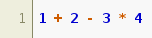
echo "1 + 2 - 3 * 4" | myenv/bin/pygmentize -l calc
You should see something like:
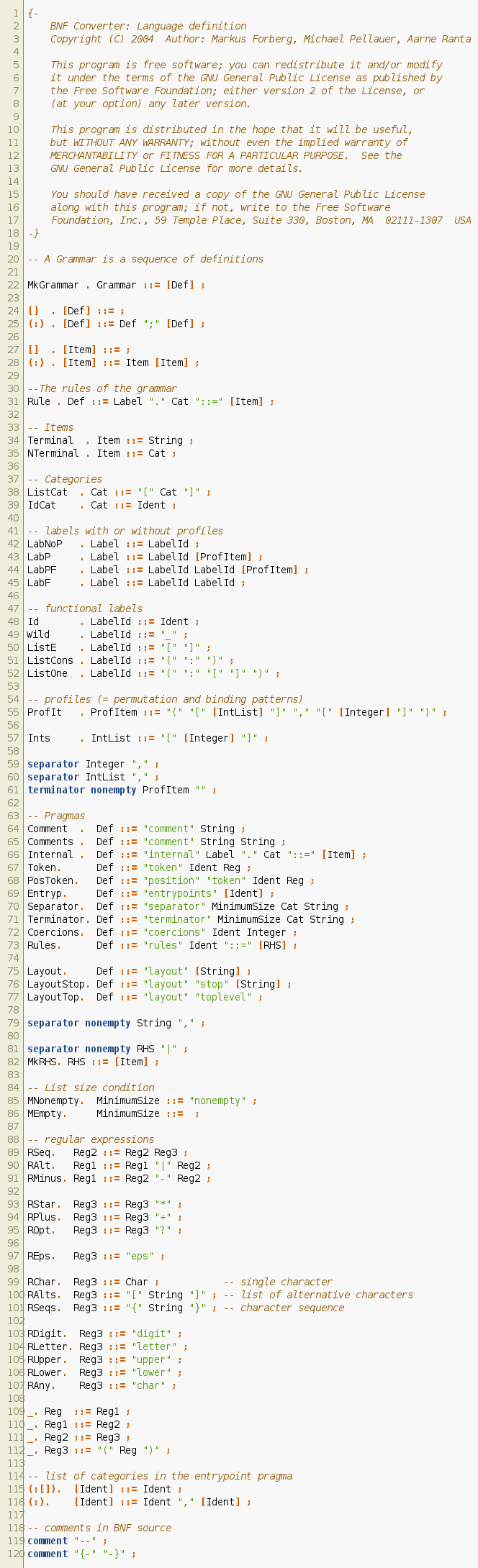
Here is the LBNF grammar highlighted with the pygments lexer generated from it:
Caveats
The generated lexer has very few highlighting categories. In particular, all keywords are highlighted the same way, all symbols are highlighted the same way and it doesn’t use context (so, for instance, it cannot differentiate the same identifier used as a function definition and a local variable…)
Pygments makes it possible to register file extensions associated with a lexer.
BNFC adds the grammar name as a file extension. So if the grammar file is
named Calc.cf, the lexer will be associated to the file extension
.calc. To associate other file extensions to a generated lexer, you need to
modify (or subclass) the lexer.